MANUFACTURING | 9 MIN READ
What Is Manufacturing ERP Software?
How does modern manufacturing ERP software help you cut waste, boost efficiency, and scale your operations?
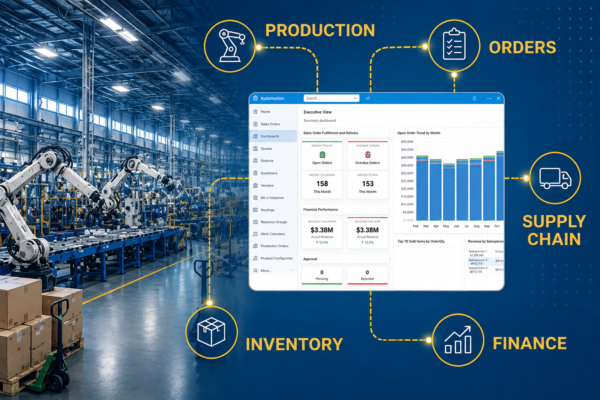
TABLE OF CONTENTS
- Why Manufacturers Need ERP Software
- What Does Manufacturing ERP Software Do?
- Who Uses ERP Software?
- Do Manufacturers Need ERP, MES, and MRP?
- ERP and CRM Integrations for Manufacturers
- Signs You've Outgrown Spreadsheets and Legacy Systems
- Choosing ERP Software for Your Business
- Choosing a Software Partner
- Manufacturing Software FAQ
Enterprise resource planning (ERP) solutions are the heart of organizations' tech stacks, drawing data from adjacent systems to create a centralized operations management platform. While ERPs are popular across many industries, they offer specific value to manufacturing companies by optimizing processes, managing inventory, and enabling sustainable growth. Manufacturing ERPs offer a variety of tools for inventory, supply chains, quality control, production schedules, and much more.
⚡ What You’ll Learn
Short on time? Start with these key sections:
- What manufacturing ERP software is and how it supports modern manufacturers.
- The manufacturing features in ERP software, including production planning, inventory management, and real-time reporting.
- How manufacturing ERP software interacts with other solutions, including MRP, MES, and CRM.
- Signs you’ve outgrown spreadsheets or legacy systems and when to consider a new ERP platform.
- How to choose the right manufacturing ERP and what to look for in a partner.
- Quick answers in the FAQ about costs, examples, and implementation timelines.
Why Manufacturers Need ERP Software
Modern manufacturers need software that can keep pace with an ever-evolving industry plagued by disruption up and down the supply chain. ERP software helps manufacturers bridge operational gaps that would otherwise result in disconnected systems, limited shop floor visibility, quality concerns, and inventory inaccuracies.
Leading solutions like Business Central for Manufacturing and Acumatica for Manufacturing help automate these processes, improve data accuracy, and give teams better visibility into inventory, production, and financial performance. With real-time reporting and fewer manual tasks, manufacturers can spend less time managing spreadsheets and more time improving operations across the entire business.
What Does Manufacturing ERP Software Do?
Manufacturing ERP software connects processes and systems across the organization to create a comprehensive control center for the shop floor and beyond. Read on to learn about the specific features and benefits of manufacturing ERP software.
Core Features of Manufacturing ERP Software
Manufacturing ERP software includes a broad suite of features, which we've broken into five key areas:
- Production: Manage the shop floor, build reliable production schedules, and ensure order fulfillment is timely and accurate.
- Specific Production Features: Shop Floor Control, Routing, Capacity Planning
- Inventory: Source, procure, and use raw materials while automating replenishment workflows to avoid stockouts.
- Specific Inventory Features: Bill of Materials (BOM), Material Requirements Planning (MRP), Substitutions
- Financials: Keep track of every organizational expense in real time.
- Specific Financial Features: Job Costing, Purchasing, General Ledger/Accounts Payable/Accounts Receivable
- Quality: Deploy automated quality assurance checkpoints and quickly trace defects or other issues back to the source.
- Specific Quality Features: Lot/Serial Traceability, Quality Assurance, WIP Tracking
- Reporting: Gather data from across the business, including other integrated solutions, to share in comprehensive reports and dashboards.
Key Operational Benefits of ERP for Manufacturers
ERPs offer the benefits of more traditional manufacturing solutions, such as MES and MRP systems, plus additional capabilities:
- Improve operational efficiency on the shop floor and beyond with workflow automations that save time and reduce stress.
- Get deeper insights into operational expenses with financial features for sales, operations, and more.
- Enable faster, more informed decision-making with accessible reports and dashboards built on real-time data.
- Encourage collaboration across departments by centralizing data and operations on one accessible platform.
- Keep valuable inventory on hand with real-time stock level tracking across all your locations.
- Stay ahead of sales orders with demand forecasting that keeps your production team and shop floor prepared.
- Communicate schedule changes with the shop floor to keep production moving and avoid delays.
Who Uses ERP Software?
Manufacturing ERP software is broad enough to bridge multiple departments and connect disparate teams across the organization. Users commonly fall into one of four categories:
- Production managers and plant leaders use ERP software for production planning and scheduling and to keep a pulse-check on progress towards production goals.
- Operations, inventory, and supply chain teams use ERP software to ensure timely order fulfillment and accurate stock levels while avoiding production bottlenecks.
- Finance and accounting teams use ERP software to track business expenses and reduce them without negatively impacting production.
- Customer-facing teams like sales use ERP software to produce sales quotes, help customers manage orders, and improve customer satisfaction.
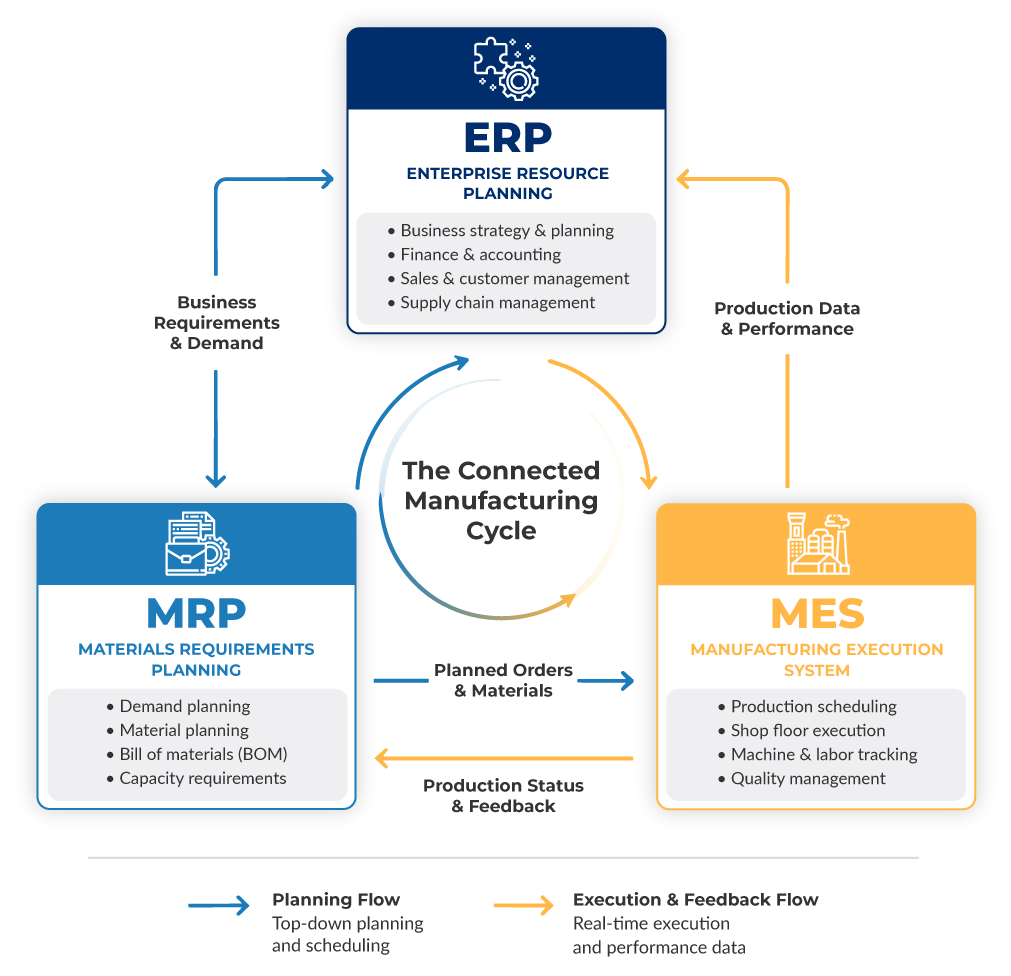
Do Manufacturers Need ERP, MES, and MRP?
Do manufacturers only need an ERP, or should they also invest in MES and MRP solutions? The answer to this question depends on the specific needs of individual manufacturers. ERPs are traditionally broader in scope than an MES or MRP. In fact, many modern ERPs—especially those built for manufacturing—come equipped with MRP features like raw material procurement and MES capabilities like real-time shop floor status updates.
While enterprise-level manufacturers operating out of several plants may find value in a comprehensive integration of these three applications, this may be too feature-dense for smaller outfits. Regardless of which systems are integrated with the ERP, it will still be the central hub for operations and production, which is why we recommend starting with an ERP and evaluating your needs once it's in place.
ERP and CRM Integrations for Manufacturers
While many manufacturers can skip MES and MRP implementations when investing in a new ERP, it's worth considering the benefits of a joint implementation that integrates an ERP with a customer relationship management (CRM) system.
CRM systems are collaborative platforms for sales, marketing, and customer service that house and manage customer data. When integrated with a manufacturing ERP, a CRM shares this data to enrich ERP reports and dashboards while giving a more complete picture of production, order fulfillment, and customer sentiment.
Ultimately, ERP and CRM solutions can be integrated to increase visibility across manufacturing organizations:
- Improve demand forecasting and production planning with more comprehensive order history and account behavior data.
- Boost customer satisfaction with self-service support tools and automated ticket routing.
- Develop marketing campaigns based on inventory stock, production schedules, and customer interest.
- Create better visibility from quote to delivery to understand where production can be streamlined.
- Simplify sales territories with segmentation that targets best-fit customers without adding more work for the sales team.
We've gathered data on the top CRMs for manufacturing companies like yours. Check out our blog to discover the power of sales, marketing, and service software for manufacturers.
Signs You've Outgrown Spreadsheets and Legacy Systems
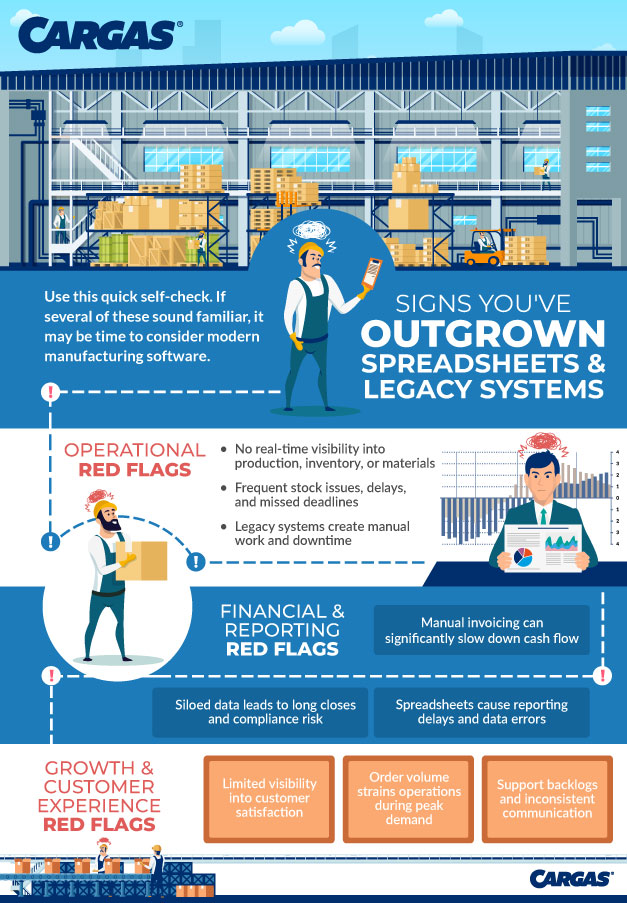
Whether you currently use an ERP for manufacturing or are still team spreadsheet (or team pen and paper), it's important to step back and review how you run day-to-day operations. If you're spending more time building workarounds than actually getting work done—or if you keep thinking, "I wish we could automate this"—you've likely outgrown your current tech stack.
Curious if your manufacturing business is outgrowing spreadsheets and legacy systems? Our infographic walks you through red flags that impact operations, finances, and growth:
Choosing ERP Software for Your Business
Choosing the right ERP system for your manufacturing business requires a deep understanding of your unique business processes, available budget, and desired features and functionality. It also means plenty of collaboration with leadership and IT as well as end users, including production managers, supply chain and inventory teams, salespeople, and accountants.
This checklist will guide internal conversations to help your team determine the best path forward as your manufacturing organization considers investing in an ERP:
- Determine areas that require the most manual input and would be much more manageable if automated
- Identify business data blind spots and chart how your current systems do or do not communicate information
- Explore what ERPs your industry competitors use
- Chart your anticipated company growth to determine required personnel and the ideal budget for your new system
- List the other solutions you currently use that your new ERP will need to integrate with
- Consider additional assistance you may require, such as user training and ongoing support
If you are strongly considering a new ERP system or thinking about upgrading your current one, we have an article you may want to check out: The 7 Best ERP Software Solutions. It covers some of the top ERP players this year and can help you better understand which options stand out.
Choosing a Software Partner
Choosing a manufacturing ERP isn't just about picking a system—it's about finding a partner who can help you build a tech stack that supports your production, your people, and your growth goals. The right partner will help you evaluate where you are today, identify gaps in your processes, and support your tech stack beyond just your ERP system.
Cargas is a dedicated, long-term software partner for manufacturers. Our team works with you to compare options, validate fit, and design an integrated software ecosystem that supports everything from demand planning and production scheduling to quoting, billing, and customer service. Once you've selected the right tools, we'll handle implementation, integrations, and user training. And as your operations evolve, we'll stay engaged with ongoing support, training, and customizations.
As an employee-owned software company and proud partner of top manufacturing ERPs from Microsoft and Acumatica—plus a variety of other integration-ready solutions for sales and marketing, accounting, and business intelligence—Cargas brings both variety and deep expertise to your software search. If you're starting to explore manufacturing ERPs, or you're ready to replace spreadsheets and legacy systems, we can help you clarify requirements, avoid common pitfalls, and move forward with confidence. Reach out to start a conversation about your manufacturing software roadmap.
Manufacturing Software FAQ

Let’s Chat
Still have questions? Get in touch with our expert team of software professionals.