MANUFACTURING | 9 MIN READ
What Is Manufacturing Software?
How does modern manufacturing software help you cut waste, boost efficiency, and scale your operations?

TABLE OF CONTENTS
Manufacturing software can transform operations by automating redundant processes to make every step more efficient. But what types of manufacturing solutions are out there? What do they do? And which one is the best fit for your business? Our ultimate guide to manufacturing software breaks down all this—and more.
⚡ What You’ll Learn
Short on time? Start with these key sections:
- What manufacturing software is and how it supports modern manufacturers.
- Different types of manufacturing software (ERP, MES, MRP, SCM, CRM, and accounting).
- Signs you’ve outgrown spreadsheets or legacy systems and when to consider a new platform.
- How to choose the right software and what to look for in a partner.
- Quick answers in the FAQ about costs, examples, and implementation timelines.
Manufacturing Software Explained
Manufacturing software is a broad term, but it can be loosely defined as any software that streamlines the manufacturing process. Solutions for operational efficiency and industry-specific modules fall under this umbrella, as do specialized systems for discrete and process manufacturing.
Designed for product-based industries like pharmaceuticals, food and beverage, biotechnology, medicine, and machinery, manufacturing software reduces waste, improves operational efficiency, and helps manufacturers scale production and customer acquisition.
How Manufacturing Software Supports Modern Manufacturers:
In many ways, modern manufacturing is more challenging than ever—as supply chains shift, raw material prices fluctuate, and customer demand skyrockets, manufacturers are spread thin.
Manufacturing software takes guesswork and redundancy out of the equation by automating and managing procurement, production, and distribution. In addition, contemporary manufacturing software often comes equipped with cloud capabilities that ensure data from every facility is timely and accurate, which provides users with a complete picture for supply planning and forecasting.
What Does Manufacturing Software Do?
Manufacturing software fulfills several needs in areas like supply chain management, logistics, procurement, and delivery. It connects people, processes, and data so you can manage production from raw materials to finished goods. Read on to discover the different types of manufacturing solutions and the unique benefits of each.
Core Functions of Manufacturing Software
Many different types of solutions can be classified as manufacturing software. Although not every solution has the same core functionality, the following features are hallmarks of a modern manufacturing system:
- Shop Floor Management: Display up-to-the-minute data related to supply, sales, and production progress.
- Production Management: Plan, manage, and optimize the use of resources, personnel, and equipment.
- Inventory & Supply Chain Management: Source and procure raw materials, and track their progress throughout production.
- Sales Order & Distribution Management: Ensure the prompt completion, shipment, and delivery of finished goods.
- Financial Management: Track procurement, production, and distribution costs to develop more accurate budgets and forecasts.
Key Operational Benefits for Manufacturers
The universal features offered by manufacturing software work together to support manufacturers at every step of operations:
- Reduce production costs and limit waste by tightening processes and minimizing errors.
- Improve customer experience and satisfaction with faster, more accurate order fulfillment.
- Ensure adequate stock levels for leaner operations without frequent stockouts or overstocking.
- Source raw materials strategically based on real-time pricing, availability, and vendor performance.
- Access real-time data to drive better, faster decision-making across the business.
- Improve product quality and compliance by standardizing processes and tightening traceability.
Types of Manufacturing Software
Not all manufacturing software is identical. Powerful solutions can differ based on features, intended users, and many other qualities. The most commonly used manufacturing solutions can be broken down into six categories:
Enterprise Resource Planning
ERPs are popular operational and accounting systems for a variety of business types, including manufacturers. These solutions integrate with other types of business software to centralize data and serve as the backbone for operations. By bringing together data from disparate systems, ERPs give users access to timely business data, which leads to smarter and faster decision-making.
Although some ERPs are equipped with features to manage supply chain, inventory, and sales orders, they may lack the depth of other types of manufacturing software. For this reason, they are often used in conjunction with other manufacturing solutions.
Manufacturing Execution Systems
MES solutions are specialized platforms that track and manage the production process as raw materials are converted into finished products. These solutions monitor multiple production lines at once to ensure optimal operations, which frees up time for production managers to focus on other responsibilities.
Think of an MES as an autonomous shop floor agent that does quality control and resource allocation, all while offering insights into production efficiency and product genealogy. MES tools help standardize instructions, reduce scrap, and provide the traceability manufacturers need to meet strict regulatory requirements.
Material Requirements Planning
An MRP is a manufacturing planning solution that coordinates the sourcing and procurement of required materials. MRPs set the stage for production by automating raw material acquisition to ensure production schedules are maintained and deadlines are met.
By accessing historical data to forecast future demand, MRPs can time orders for leaner operations, mitigate the risk of stockouts and overstocking, and help align purchasing decisions with real-time production needs.
Supply Chain Management
SCM software manages the flow of resources from procurement to distribution. Traditionally, SCMs focus on manufacturing logistics and inventory to ensure that resources are well-stocked and finished products are properly delivered.
These solutions analyze past production data to forecast future production needs and are designed to adapt as vendor offerings and pricing fluctuate, helping materials move efficiently and reliably through every stage of the supply chain.
Customer Relationship Management
CRM solutions are customer-focused platforms to manage sales, marketing, and customer service. While these solutions are not inherently manufacturing platforms, they round out production capabilities with dedicated tools to ensure that finished products meet—or exceed—customer expectations.
When integrated with manufacturing systems for production, CRMs can synchronize sales data with operational data to improve forecasting and production planning.
Accounting for Manufacturing
Other manufacturing solutions, such as ERPs, already have accounting features baked in. However, they may not offer the breadth or depth of capabilities that some manufacturers require.
Accounting software for manufacturing handles inventory and regulatory compliance while managing quotes, budgets, and other key financial data. These solutions cut down on manual data entry to reduce errors and save time for accountants and other finance team members.
Do I Need ERP, MES, MRP—Or All Three?
With so many software options available for manufacturers, it may seem beneficial to look for one solution that suits most of an organization’s needs. While one solution can bring a slew of benefits, manufacturing software performs best when multiple systems are used in tandem to streamline all the factors that influence production. One of the most comprehensive combinations is an integrated tech stack with an ERP, MES, and MRP.
How These Systems Work Together
The manufacturing process can be broken into three stages: procurement of raw materials, production, and distribution of finished goods to wholesalers or customers. With their combined capabilities, ERP, MES, and MRP solutions can manage all these processes and extend to other essential operational areas. Here’s how this integration might look:
- The MRP places orders for raw materials to ensure timely delivery that syncs with production schedules
- The MES tracks the progression of those raw materials as they are manufactured to finished products, providing users an unobstructed view of progress on the shop floor
- The ERP houses sales orders and tracks product distribution to ensure customers receive their orders quickly
- The ERP pools all production data—including from the MRP and MES systems—to determine whether sales goals and standards were met; it also tracks new sales orders as they are submitted
- Adjustments and new sales requests are communicated back to the MRP so that new materials can be ordered
- Additional information is communicated to the MES to assist in optimizing the production process
This cyclic relationship between ERP, MES, and MRP software takes process management beyond the shop floor to handle planning, ordering, execution, and delivery while streamlining operations along the way.
Choosing the Right Software
No two manufacturing solutions are the same; even if two SCM systems have similar features, they’ll likely perform differently for different businesses. When considering an investment in manufacturing software, decision-makers should consider factors beyond just features, such as:
- Business size
- Budget
- Existing software that will need to integrate
- Future growth opportunities
- Industry regulations
- Support needs
For instance, smaller manufacturers may prefer Xero for accounting due to its low monthly cost and no-frills feature set. However, that same organization may eventually outgrow Xero and upgrade to another manufacturing-friendly solution like Sage Intacct, which offers deep accounting functionality and strong integrative capabilities.
Or, a small or mid-sized manufacturer on the hunt for an ERP may opt for Business Central if the business uses other Microsoft products and services. A similar organization that has already invested in multiple third-party solutions may instead choose Acumatica for Manufacturing, while much larger organizations may feel their needs are best met by a costly yet comprehensive solution from SAP.
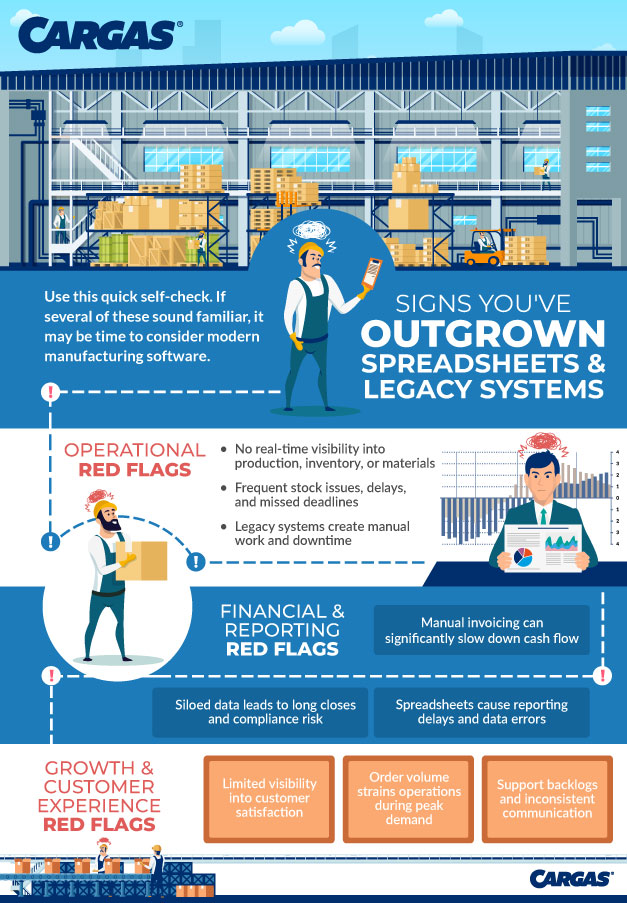
Signs You’ve Outgrown Spreadsheets and Legacy Systems
Whether you currently use manufacturing software or are still team spreadsheet (or team pen and paper), it’s important to step back and review how you run day-to-day operations. If you’re spending more time building workarounds than actually getting work done—or if you keep thinking, “I wish we could automate this”—you’ve likely outgrown your current tech stack.
Choosing Manufacturing Software for Your Business
Choosing the right manufacturing software for your business is a complicated decision to make. It requires insights from team members across the organization—planners, customer service managers, finance professionals, and production managers on the shop floor. But before you decide which software developers to research, you should understand the exact needs this software will satisfy:
- Determine areas that require the most manual input and would be much more manageable if automated
- Identify business data blind spots and chart how your current systems do or do not communicate information
- Explore what software your industry competitors use
- Chart your anticipated company growth to determine required personnel and the ideal budget for your new system
- List the other solutions you currently use that your new software will need to integrate with
- Consider additional assistance you may require, such as user training and ongoing support
Choosing a Software Partner
Choosing manufacturing software isn’t just about picking a system—it’s about finding a partner who can help you build a tech stack that supports your production, your people, and your growth goals. The right partner will help you evaluate where you are today, identify gaps in your processes, and map those needs to the right combination of ERP, MES, MRP, SCM, CRM, and accounting solutions.
Cargas acts as that partner for manufacturers. Our team works with you to compare options, validate fit, and design an integrated stack that supports everything from demand planning and production scheduling to quoting, billing, and customer service. Once you’ve selected the right tools, we handle implementation, integrations, and user training—and we stay engaged with ongoing support as your operations evolve.
As an employee-owned software company and proud partner of Microsoft, Sage, Salesforce, HubSpot, Acumatica, and other integration-ready solutions, Cargas brings both variety and deep expertise to your software search. If you’re starting to explore manufacturing software—or you’re ready to replace spreadsheets and legacy systems—we can help you clarify requirements, avoid common pitfalls, and move forward with confidence. Reach out to start a conversation about your manufacturing software roadmap.
Manufacturing Software FAQ

Let’s Chat
Still have questions? Get in touch with our expert team of software professionals.